my-pane — Client API Guide
Audience. A coding agent building a client (iOS app, third-party integration, internal tooling) against
my-pane-server. Read top-to-bottom. Everything you need to wire up auth, publish, and read the feed is here.Source of truth. This guide describes the wire contract of the v1 API. If a sample in here ever disagrees with
src/app/api/v1/**in the server repo, the server wins — but file an issue, this doc should match.
Canonical published URLs
Don't ship copies of this file. Fetch from the server. All three URLs are hosted by the same deployment as the API and update on every push:
| What | URL | Content-Type |
|---|---|---|
| This guide, rendered | ${BASE}/docs/api | text/html |
| This guide, raw markdown | ${BASE}/docs/api.md | text/markdown |
| Pane type reference, one page per type (fields, previews, examples) | ${BASE}/pane-types | text/html |
| Pane style guide (how to compose a good card) | ${BASE}/docs/panes.md | text/markdown |
| Design system | ${BASE}/docs/design | text/html (single-file, self-contained) |
| MCP server (Streamable HTTP) | ${BASE}/api/mcp | MCP JSON-RPC |
${BASE} is your deployment origin — https://localhost:3000 in dev,
your Vercel URL in prod. Screenshots referenced below resolve relative to
the same origin (/docs/images/*.png).
1. System in one paragraph
my-pane is a per-user feed of typed "panes" (e.g. tweet, price, kpi,
news). Publishers (agents, third-party services) push panes into a
user's feed by calling POST /api/v1/feed/items with a bearer token issued
to that user. Clients (e.g. the iOS app) pull the feed back via
GET /api/v1/feed/items with the same kind of token. The feed is FIFO —
default read order is oldest-first; you may request newest-first. There is
exactly one feed per user, named "default". Items are retained forever.
Prefer MCP? Everything below is also exposed as a remote MCP server at
${BASE}/api/mcp(Streamable HTTP) — token validation, pane-type discovery, publish, read, complete, delete. The tools run the same validation and metering as the REST routes.Connect it to Claude in two minutes: in claude.ai or Claude Desktop go to Settings → Connectors → Add custom connector and enter
https://getpanes.com/api/mcp(leave the advanced OAuth fields empty). Click Connect — you'll land on the Panes login page, paste yourmp_API token once, approve, and Claude holds a revocable OAuth grant from then on. A "Connector linked" pane appears in your feed to confirm it works. For Claude Code:claude mcp add --transport http panes https://getpanes.com/api/mcpthen/mcp→ panes → Authenticate.Headless agents and scripts can skip OAuth entirely and send
Authorization: Bearer mp_…on the connection instead. Seedocs/MCP.mdin the server repo for the full tool reference and auth details.
2. Base URL and versioning
- Local dev:
https://localhost:3000— served with a self-signed cert bynext dev --experimental-https. iOS clients pointed at this host during development need to allow the self-signed cert (see §7.8).curlusers need-k/--insecure. - Production: whatever
NEXT_PUBLIC_APP_URLis in Vercel — always HTTPS, with a real CA-signed cert. - All endpoints are versioned in the path under
/api/v1/…. When v2 ships, v1 stays online for a deprecation window. - Every response includes
X-MyPane-Api-Version: 1. Clients should surface a "please update" warning if they see a major version newer than the one they were built against. - Every response also carries a standard HTTP
Dateheader — the server's clock. Anything the client counts against the current time (acountdownpane'starget, §6.17) should measure the device's skew against this header rather than trust the phone's clock.
3. Authentication
There is one credential type: the bearer API token. There are no passwords. A token looks like:
mp_<base64url(24 random bytes)>
Tokens are issued at signup (and on demand from the dashboard). The server
stores only SHA-256(token) — plaintext is shown once at creation and
never recoverable. Losing it means generating a new one.
How to use a token
For every protected endpoint, send:
Authorization: Bearer mp_…
What if the user has no token yet?
There is no API-driven onboarding path that doesn't return a token — signup itself issues one. The expected flow for an iOS client is:
- New user → user pastes a token they got from the website's signup flow
or the iOS app calls
POST /api/v1/auth/signupdirectly (see below). - Returning user → user pastes their existing token.
Either way, store the token in the iOS Keychain with
kSecAttrAccessibleAfterFirstUnlockThisDeviceOnly (or equivalent). Do not
store it in UserDefaults.
Session cookie
The server also issues an HttpOnly session cookie for use by its web
dashboard. iOS clients should ignore it. All iOS calls use bearer
tokens; never persist or send the session cookie from a native client.
4. Common conventions
Content type
Always application/json; charset=utf-8 for request and response bodies.
Error envelope
Every non-2xx response (including validation errors) returns:
{
  "error": {
    "code": "bad_request" | "unauthorized" | "forbidden" | "not_found" |
            "conflict" | "internal",
    "message": "Human-readable summary",
    "details": { … }      // optional, present for validation errors
  }
}
When code === "bad_request" and the request failed Zod validation, the
details field is a flatten()'d Zod error:
{
  "error": {
    "code": "bad_request",
    "message": "Invalid signup payload",
    "details": {
      "formErrors": [],
      "fieldErrors": {
        "email":         ["Invalid email"],
        "dateOfBirth":   ["Date of birth must be a real past date (>= 1900)"]
      }
    }
  }
}
Status codes
| Status | When |
|---|---|
| 200 OK | Successful read or login. |
| 201 Created | New user, token, or feed item. |
| 204 No Content | Logout, revoke, delete. |
| 400 Bad Request | Body validation failed; unknown pane type; payload too large; bad cursor. |
| 401 Unauthorized | Missing/invalid token or session. |
| 403 Forbidden | Currently unused; reserved. |
| 404 Not Found | User / token / feed item doesn't exist or isn't yours. |
| 409 Conflict | Email already in use during signup. |
| 500 Internal | Bug. Worth retrying once with exponential backoff. |
Cursor pagination
GET /api/v1/feed/items returns:
{
  "items": [ … ],
  "nextCursor": "eyJpIjoiMDFLUk04WEpWWkdaVlhUNTI2RDZCRVBYRUMifQ" | null
}
nextCursoris opaque base64url — do not decode or parse it. Pass it back verbatim as?cursor=…to get the next page.nextCursor === nullmeans you've reached the end of that page direction.- A new item published after you started paginating will appear when you start a fresh ascending read (because its ULID sorts after your last cursor). For "tail the feed in real time," see §7.4.
Item-size cap
Publish requests are capped at 380,000 bytes (the body, not just data).
This mirrors DynamoDB's 400 KB item ceiling so behavior is identical in dev
(SQLite) and prod (DynamoDB). Larger payloads return 400 bad_request with
message Payload too large.
Timestamps
All createdAt / lastUsedAt / dateOfBirth-adjacent timestamps are ISO-8601
in UTC (2026-05-15T07:30:00.000Z). The one exception is dateOfBirth
itself, which is YYYY-MM-DD (no time component — birthdays don't have
timezones).
A countdown pane's data.target follows the same rule on read: it is
returned as a UTC instant (2026-10-04T07:00:00.000Z) whatever offset it was
published with. See §6.17.
5. Endpoints
5.1 Health
GET /api/v1/health — public, no auth.
Returns whether the server is up and which DB driver it's running against (useful for distinguishing dev/staging/prod).
curl -sk https://localhost:3000/api/v1/health
{ "status": "ok", "driver": "sqlite", "time": "2026-05-15T07:30:00.000Z" }
Monitoring endpoints (root, unversioned)
For external uptime/load monitors there are two well-known root paths (unversioned on purpose — monitors shouldn't track the API version):
GET /health — public, no auth. Liveness and readiness: runs one cheap
point-lookup through the DB layer. Returns 200 with
{ "status": "ok", ... } when the DB is reachable, 503 with
{ "status": "unhealthy", ... } when it isn't. (The /api/v1/health above is
the lighter in-band check that does not touch the DB.)
curl -sk https://localhost:3000/health
GET /metrics — gated. Prometheus text exposition format (request counts,
error counts by status class, cumulative latency, uptime). Requires a bearer
token (METRICS_TOKEN, falling back to ADMIN_PASSWORD); fails closed with
503 if neither is configured. Operational metrics are reconnaissance-useful,
so this endpoint is not public.
curl -sk -H "Authorization: Bearer $METRICS_TOKEN" https://localhost:3000/metrics
5.2 Sign up
POST /api/v1/auth/signup — public.
Creates a user and issues their first API token. The token plaintext is returned only here, only once — copy it immediately.
Request
{
  "firstName": "Ben",
  "lastName": "Magro",
  "dateOfBirth": "1987-01-09",
  "email": "ben@example.com"
}
Validation:
firstName,lastName: 1–80 chars, requireddateOfBirth:YYYY-MM-DD, must be a real date in the past, year ≥ 1900email: RFC-5322-ish, ≤ 254 chars
Response — 201 Created
{
  "user": {
    "id": "01KRM8ZPGA8PZD0Z7S24KSZQ1M",
    "email": "ben@example.com",
    "firstName": "Ben",
    "lastName": "Magro",
    "dateOfBirth": "1987-01-09",
    "createdAt": "2026-05-14T22:16:16.650Z"
  },
  "token": {
    "tokenId": "01KRM8ZPGSQT2MWH8CPFAPZHJ4",
    "name": "default",
    "createdAt": "2026-05-14T22:16:16.650Z",
    "token": "mp_RP7RGJx9kQwx…"        // <- save this. Shown once.
  },
  "refreshToken": {
    "refreshTokenId": "01KRM8ZPH…",
    "expiresAt": "2026-06-13T22:16:16.650Z",
    "token": "mp_rt_…"                 // <- save this too. Renews the session (§5.4.1).
  }
}
Errors
| Status | Code | When |
|---|---|---|
| 400 | bad_request | Validation failed (see details). |
| 409 | conflict | Email already in use. |
curl -k -X POST https://localhost:3000/api/v1/auth/signup \
  -H "Content-Type: application/json" \
  -d '{"firstName":"Ben","lastName":"Magro","dateOfBirth":"1987-01-09","email":"ben@example.com"}'
5.3 Log in with a token
POST /api/v1/auth/login — public.
For native clients you probably don't need this. It exists so the web dashboard can recognize a returning user. iOS clients hold the token in Keychain and send it as a bearer header on every request; they don't need a session cookie.
Request
{ "token": "mp_…" }
Response — 200 OK
Returns the same user shape as /auth/me, sets the mp_session
HttpOnly cookie, and includes a refreshToken (see §5.4.1). Native clients
should discard the cookie but keep the refresh token.
{
  "user": { "...": "..." },
  "refreshToken": {
    "refreshTokenId": "01J…",
    "expiresAt": "2026-07-30T22:16:16.650Z",
    "token": "mp_rt_…"
  }
}
Errors
| Status | Code | When |
|---|---|---|
| 401 | unauthorized | Token is unknown or revoked. |
5.4 Log out
POST /api/v1/auth/logout — session cookie required.
Clears the session cookie. Optionally pass { "refreshToken": "mp_rt_…" } in
the body to also kill that refresh token server-side (recommended — a leaked
copy then can't be replayed). Returns 204 No Content.
Web-only. iOS clients don't call this; they "log out" by deleting the token from Keychain.
5.4.1 Refresh the session
POST /api/v1/auth/refresh — public (the refresh token IS the credential).
The short-lived session ("access token") issued at login / email-verification can be renewed without re-pasting the API token by exchanging the long-lived refresh token returned at that time.
Refresh tokens are single-use. Every successful refresh ROTATES the token:
the presented one is invalidated and a brand-new one returned. Always replace
your stored refresh token with the one from the response. A refresh token also
expires (30 days) and can be revoked server-side at logout. If a client hits a
401, it should retire its refresh token (via /auth/logout with the token in
the body) and send the user back through login.
Request
{ "refreshToken": "mp_rt_…" }
Response — 200 OK
Returns the same user shape as /auth/me, sets a fresh mp_session cookie,
and returns the rotated refresh token. The previous refresh token is now dead.
{
  "user": { "...": "..." },
  "refreshToken": {
    "refreshTokenId": "01J…",
    "expiresAt": "2026-07-30T22:16:16.650Z",
    "token": "mp_rt_…"
  }
}
Errors
| Status | Code | When |
|---|---|---|
| 401 | unauthorized | Refresh token is unknown, already used, revoked, or expired. |
| 429 | rate_limited | Too many refresh attempts from this IP. |
5.5 Current user
GET /api/v1/auth/me — session cookie required.
Web-only. The session is set by
/auth/login. iOS clients usually don't need this — they already know the user from when the token was provisioned. If a client genuinely needs profile info given only a bearer token, we'll addGET /api/v1/auth/me-by-tokenin v2.
Response — 200 OK
{
  "user": {
    "id": "01KRM8ZPGA8PZD0Z7S24KSZQ1M",
    "email": "ben@example.com",
    "firstName": "Ben",
    "lastName": "Magro",
    "dateOfBirth": "1987-01-09",
    "createdAt": "2026-05-14T22:16:16.650Z"
  },
  "plan": "free",
  "planExpiresAt": null,
  "pane_count": 12
}
Alongside the user profile, the response carries the caller's subscription
and feed state:
| Field | Type | Notes |
|---|---|---|
plan | "free" | "pro" | Subscription tier. pro after a verified receipt (see §5.10). Defaults to free. |
planExpiresAt | string | null | ISO-8601 expiry of a pro entitlement, or null. Informational — the server does not auto-downgrade. |
pane_count | number | The user's active (non-expired, non-completed) pane count. |
Clients may rely on the exact keys
planandpane_countbeing present at the top level. Other fields are additive and safe to ignore.
Delete the account
DELETE /api/v1/auth/me — bearer token (a web session also works).
Permanently deletes the caller's account.
| Status | When |
|---|---|
| 204 No Content | Deleted. |
| 401 Unauthorized | Token missing, invalid, or already revoked. |
curl -sk -X DELETE https://getpanes.com/api/v1/auth/me \
  -H "Authorization: Bearer mp_…" -i
This is a hard delete, not a deactivation, and it is immediate and irreversible — there is no undo and no recovery window. (Apple's App Store guidelines require in-app account deletion to actually delete the account, so a "deactivate only" flow is not offered.) One operation removes:
- the user record,
- every feed item (pane) they own,
- all API tokens and refresh tokens,
- any pending email-verification record,
- the plan / subscription linkage stored on the user (
plan,planExpiresAt,originalTransactionId).
After a successful call the bearer token used to make it is already invalid —
every subsequent request returns 401.
It does NOT cancel an Apple subscription. Apple owns that lifecycle; the server can only forget its own linkage. A client that offers account deletion should tell the user to cancel the subscription separately in the App Store (Settings → Apple Account → Subscriptions), otherwise they keep being billed.
5.6 List tokens
GET /api/v1/auth/tokens — session cookie required.
Web-only.
Response — 200 OK
{
  "tokens": [
    {
      "tokenId": "01KRM8ZPGSQT2MWH8CPFAPZHJ4",
      "name": "default",
      "createdAt": "2026-05-14T22:16:16.650Z",
      "lastUsedAt": "2026-05-15T07:21:04.187Z"
    }
  ]
}
Plaintext tokens are never returned here. There is no "show again" path.
5.7 Create token
POST /api/v1/auth/tokens — session cookie required.
Web-only. Used by the dashboard to mint additional tokens (e.g. one per integration). Native clients are expected to use the token they were provisioned with; if they need to rotate, the user does it in the web dashboard and pastes the new token into the app.
Request
{ "name": "yahoo-finance-agent" }
Response — 201 Created
{
  "tokenId": "01KRMC0X7PD9P5VK0WQJWNAHJ4",
  "name": "yahoo-finance-agent",
  "createdAt": "2026-05-15T07:30:00.000Z",
  "token": "mp_…"      // shown once
}
5.8 Revoke token
DELETE /api/v1/auth/tokens/{tokenId} — session cookie required.
Web-only.
Response — 204 No Content if deleted, 404 not_found otherwise.
After revocation, any request using that token returns 401. There is no
grace period.
5.9 Pane type discovery
GET /api/v1/panes/types — public, no auth.
Returns one entry per registered pane type. Each entry has:
| Field | Type | Notes |
|---|---|---|
type | string | The pane's identifier (e.g. "price", "chart", …). Use this as type when publishing. |
description | string | One-line human description. |
dataSchema | object | JSON Schema (OpenAPI 3 dialect) for the pane's data payload, generated directly from the live Zod schema. This is the machine-readable source of truth — what's documented in §6 is the human-readable equivalent of the same shape. |
The same descriptions are rendered for people at /pane-types (one page
per type, e.g. /pane-types/price), generated from the same registry.
Treat this endpoint as the canonical schema for data payloads. The
human-readable catalog in §6 below is hand-curated from the same Zod
definitions, but if there's ever a mismatch, what the live endpoint
returns wins. Fetch it at app launch and cache it; re-fetch on long
background-resume in case a new pane type or field has shipped.
Response shape (truncated for readability):
{
  "types": [
    {
      "type": "price",
      "description": "A live price quote with a sparkline and OHLC summary.",
      "dataSchema": { /* full JSON Schema — fetch the live endpoint */ }
    },
    {
      "type": "chart",
      "description": "A line chart of a single series over a window, with axis and OHLC summary.",
      "dataSchema": { /* … */ }
    }
    /* … 15 more pane types … */
  ]
}
Why no inline schema example? Hand-writing a JSON-Schema sample here would drift the moment a field is added or renamed. The previous version of this section did exactly that and ended up misleading clients (a stale example contributed to a real renderer bug downstream). The live endpoint is generated from the same Zod definitions that validate publishes — they can't drift from each other. Trust it.
5.10 Publish a feed item
POST /api/v1/feed/items — bearer token required.
Publishes a single pane to the authenticated user's default feed. The
server validates data against the registered schema for type and rejects
unknown types.
Request
{
  "type": "tweet",
  "publisher": "X",
  "publisherInit": "X",
  "publisherColor": "#000000",
  "label": "From people you follow",
  "data": {
    "author": "Paul Graham",
    "handle": "@paulg",
    "text": "The most underrated skill in startups isn't writing code or talking to users. It's deciding what not to do.",
    "likes": "4.2K",
    "replies": 318
  }
}
Common request fields (apply to every pane type):
| Field | Required | Notes |
|---|---|---|
type | yes | One of the registered types. Unknown → 400. |
publisher | yes | Display name of the source (e.g. "Yahoo Finance"). 1–80 chars. |
publisherInit | no | 1–3 character avatar/badge initial. |
publisherColor | no | CSS color (hex / rgb() / named). |
label | no | Short subheading shown above the pane (e.g. "Markets"). ≤ 120 chars. |
readable | no | Boolean, default false. Marks a pane that reads well aloud — see below. Must be a real boolean; "true" / 1 are rejected. |
priority | no | Boolean, default false. Notify within a minute instead of in the hourly batch — see below. Must be a real boolean. Capped per token. |
data | yes | Type-specific object, must match the registry schema. |
expiresAt | no | ISO-8601 datetime after which the pane is hidden from the feed. Omit for a pane that never expires. |
readable — panes that can be spoken. Setting readable: true tells the
client this card reads well aloud, so it may show a speaker control that reads
the card's contents on tap. The server only carries the flag: it never
generates or stores spoken text, and deciding what "the contents" means is the
client's job.
- Optional, default
false, and absent meansfalse. Omitting it is the correct choice for most panes; existing publishers need change nothing. - Set it for content that genuinely reads well aloud —
news,quote, a shortlist, akpiwith a sentence of context — and for hands-free or accessibility situations. - Don't set it for dense numeric cards,
code, anything whose value is visual (chart,image,video,map), oraudio, which already carries sound. - It is accepted on every pane type, including those: only the client knows whether it can render a speaker control, so the list above is guidance, not validation.
priority — panes that are worse to read an hour late. Setting
priority: true sends the pane on the server's fast notification lane: it is
pushed within a minute (§5.19), naming its publisher and label, instead of
waiting for the hourly batch.
- Optional, default
false, and absent meansfalse. Existing publishers need change nothing; their panes notify exactly as before. - For things that lose their value by waiting — a countdown about to fire, a price alert that crossed its line, an outage. Not for everything: a user who gets a time-sensitive push for every pane learns to ignore all of them.
- Capped per token: 5 an hour and 20 a day by default (the server can tune
both). Past the cap the publish still succeeds — the pane is stored and
returned with
priority: false, joins the normal hourly batch, and the response carries astyleNotesentry withfield: "priority"saying so. Nothing is rejected. - Ignored (with a style note) on an in-place update to a live list card, which never notifies.
- Accepted on every pane type. On read,
priorityis what the server honoured, not what was asked for.
Response — 201 Created
{
  "item": {
    "itemId": "01KRMC3X8GBHJN2N1Y7YYBT3WQ",
    "userId": "01KRM8ZPGA8PZD0Z7S24KSZQ1M",
    "feedId": "default",
    "type": "tweet",
    "publisher": "X",
    "publisherInit": "X",
    "publisherColor": "#000000",
    "label": "From people you follow",
    "readable": false,
    "priority": false,
    "data": { "author": "Paul Graham", … },
    "createdAt": "2026-05-15T07:30:21.512Z",
    "tokenId": "01KRMC0X7PD9P5VK0WQJWNAHJ4",
    "status": "active",
    "expiresAt": null
  }
}
itemId is a ULID — lexicographically sortable by time. Use it for
de-dup keys, stable IDs in your local store, and as the cursor anchor.
Errors
| Status | Code | When |
|---|---|---|
| 400 | bad_request | Validation failed for the envelope or data. Unknown type. Payload > 380 KB. |
| 401 | unauthorized | Missing or invalid bearer token. |
5.11 Read the feed
GET /api/v1/feed/items — bearer token required.
Query parameters
| Name | Type | Default | Notes |
|---|---|---|---|
limit | int | 20 | 1–100. |
order | "asc" | "desc" | "asc" | asc = FIFO (oldest first), desc = newest first. |
cursor | opaque string | — | Pass back the previous nextCursor. |
after | itemId | — | Incremental sync. Return only items strictly newer than this itemId. See below. |
updatedSince | ISO-8601 | — | Incremental sync, part two. Also return items that CHANGED strictly after this instant, even when their itemId is below after. See below. |
Response — 200 OK
{
  "items": [
    {
      "itemId": "…",
      "userId": "…",
      "feedId": "default",
      "type": "code",
      "publisher": "GitHub",
      "publisherInit": "⌘",
      "publisherColor": "#0E0E0E",
      "label": "main · build #1421 ✓",
      "readable": false,
      "priority": false,
      "data": { "repo": "mypane/web", … },
      "createdAt": "2026-05-15T06:00:00.000Z",
      "updatedAt": "2026-05-15T06:00:00.000Z",
      "tokenId": "…",
      "status": "active",
      "expiresAt": null
    }
    /* … */
  ],
  "nextCursor": "eyJpIjoiMDFL…" | null
}
Pagination contract. Loop:
cursor = null
while True:
  page = GET /feed/items?limit=20&cursor=cursor
  yield page.items
  if page.nextCursor is None: break
  cursor = page.nextCursor
cursor is opaque — do not parse it.
Incremental sync with after. itemIds are ULID-sortable, so "newer" ==
lexicographically greater. A client that already holds history should store the
greatest itemId it has seen (its high-water mark) and, on the next sync,
pass it as ?after=<itemId> to fetch only the panes published since — in a
single query — instead of paging the whole feed. after composes with order
and cursor (if the new-item set exceeds limit, page it with cursor as
usual). First-ever sync (no high-water mark) omits after and typically pulls
the most recent page with order=desc + limit, loading older history lazily.
# incremental catch-up (oldest-new first, paged)
cursor = null
while True:
  page = GET /feed/items?after=<highWaterMark>&order=asc&limit=100&cursor=cursor
  yield page.items
  if page.nextCursor is None: break
  cursor = page.nextCursor
# then advance highWaterMark to the greatest itemId received
Why after alone is no longer enough: updatedSince. Every pane used to be
immutable once published, so "new" and "changed" were the same thing. A live
list pane (§6.15) breaks that: it keeps its itemId while its contents move as
the stored list behind it is edited. Its id is therefore below your
high-water mark, and after can never surface it.
So items now also carry updatedAt — equal to createdAt for an ordinary
pane, later for one that has changed — and the read takes a second, independent
bound. The two compose with OR, not AND: after brings new panes,
updatedSince brings changed ones.
# full incremental sync
page = GET /feed/items?after=<highWaterMark>&updatedSince=<lastSyncedAt>&order=asc&limit=100
# advance highWaterMark to the greatest itemId received,
# and lastSyncedAt to the time of this successful sync
An item returned because it changed is one you already hold: replace your
copy by itemId rather than appending it. updatedSince is an exclusive
lower bound, so pass the timestamp of the last sync you completed.
Errors
| Status | Code | When |
|---|---|---|
| 400 | bad_request | Invalid limit/order/cursor. |
| 401 | unauthorized | Missing or invalid bearer token. |
curl -sk 'https://localhost:3000/api/v1/feed/items?order=asc&limit=10' \
  -H "Authorization: Bearer mp_…"
5.12 Get a single item
GET /api/v1/feed/items/{itemId} — bearer token required.
Returns the full item for the calling user. Returns 404 not_found if the
item doesn't exist, belongs to someone else, has been completed, or has expired.
Response — 200 OK
{ "item": { /* same shape as in §5.11 */ } }
5.13 Delete an item
DELETE /api/v1/feed/items/{itemId} — bearer token required.
Hard-deletes one item from the calling user's feed. Returns 204 No Content
on success, 404 not_found if it didn't exist.
5.14 Mark an item completed
PATCH /api/v1/feed/items/{itemId} — bearer token required.
Marks a pane as completed — the user has acted on it (tapped, swiped away,
fulfilled the action). Completed panes are hidden from GET /feed/items and
single-item GET /feed/items/{itemId}.
Request
{ "status": "completed" }
Response — 200 OK
Returns the updated item (including "status": "completed"). After this
call the item will no longer appear in feed reads — hold the response if you
need a local copy.
Errors
| Status | Code | When |
|---|---|---|
| 400 | bad_request | Invalid payload. |
| 401 | unauthorized | Missing or invalid bearer token. |
| 404 | not_found | Item doesn't exist or doesn't belong to this user. |
curl -sk -X PATCH https://localhost:3000/api/v1/feed/items/01KRMC3X8GBHJN2N1Y7YYBT3WQ \
  -H "Authorization: Bearer mp_…" \
  -H "Content-Type: application/json" \
  -d '{"status":"completed"}'
5.15 Verify a purchase receipt
POST /api/v1/verify-receipt — bearer token required.
Submits an Apple StoreKit signed transaction (a compact JWS) for verification.
On success the server records the user's subscription: it sets plan to pro,
stores Apple's originalTransactionId, and captures the entitlement expiry.
The updated plan is then reflected by GET /api/v1/auth/me (§5.5).
Request
{ "signedTransaction": "eyJhbGciOiJFUzI1NiIs….<payload>.<signature>" }
| Field | Type | Notes |
|---|---|---|
signedTransaction | string | The StoreKit 2 Transaction.jwsRepresentation (compact JWS). |
Response — 200 OK
{
  "plan": "pro",
  "planExpiresAt": "2026-08-08T12:00:00.000Z",
  "originalTransactionId": "2000000012345678"
}
Errors
| Status | Code | When |
|---|---|---|
| 400 | bad_request | Malformed JSON, or the transaction fails verification. |
| 401 | unauthorized | Missing or invalid bearer token. |
Verification backend. Which verifier runs is selected by the
APPLE_VERIFY_DRIVERserver env var. The default (stub) decodes the JWS payload without checking its signature and is for dev/CI only. The production driver (apple) — real App Store Server API verification — is a follow-up card and is not implemented yet. Plan state, the storage schema, and this wire contract are all final; only the signature-checking internals change when it lands.
No server-side entitlement enforcement. The server never gates pane writes on
plan— publishing works identically onfreeandpro.planis a signal for the client to unlock features; enforcement is the client's job.planExpiresAtis informational and does not trigger an auto-downgrade.
5.16 RevenueCat webhook
POST /api/v1/webhooks/revenuecat — server-to-server; not for client use.
This endpoint is called by RevenueCat, not by the app. When Pro subscriptions
are purchased/renewed/expired through RevenueCat, RC POSTs a lifecycle event here
and the server updates the user's plan (reflected by GET /api/v1/auth/me,
§5.5). The iOS app's only responsibility is to set the RevenueCat appUserID to
the user's my-pane id — that's how app_user_id on the event maps to a user.
Auth. RevenueCat sends a static shared secret (configured in the RevenueCat
dashboard) verbatim as the Authorization header. The server compares it
(constant-time) against the REVENUECAT_WEBHOOK_SECRET env var; a missing or
mismatched header returns 401. If the env var is unset the endpoint rejects
every request (fails closed).
Request — RevenueCat's event envelope (only the fields the server reads are shown):
{
  "event": {
    "type": "INITIAL_PURCHASE",
    "app_user_id": "<my-pane user id>",
    "product_id": "pro_monthly",
    "expiration_at_ms": 1754654400000,
    "original_transaction_id": "2000000012345678"
  }
}
Event → plan mapping
event.type | Effect |
|---|---|
INITIAL_PURCHASE, RENEWAL, PRODUCT_CHANGE, UNCANCELLATION, NON_RENEWING_PURCHASE | plan → pro; planExpiresAt = ISO of expiration_at_ms (or null); records original_transaction_id. |
EXPIRATION | plan → free; clears planExpiresAt. |
CANCELLATION | No change — access continues until EXPIRATION at period end (logged only). |
| any other type | No-op ack. |
Response — 200 OK — a small ack, e.g. { "ok": true, "plan": "pro", "planExpiresAt": "…" }.
An unknown app_user_id or unmapped event type is also acked with 200 (so
RevenueCat stops retrying) and logged server-side.
Errors
| Status | Code | When |
|---|---|---|
| 400 | bad_request | Body is not valid JSON. |
| 401 | unauthorized | Missing/invalid Authorization, or REVENUECAT_WEBHOOK_SECRET unset. |
Dashboard setup (deferred). Going live requires setting
REVENUECAT_WEBHOOK_SECRETon the server and configuring the matching webhook URL + Authorization value in the RevenueCat dashboard. Until then the endpoint exists but rejects (401) every call.
5.17 Register a device for push
POST /api/v1/devices — bearer token (or session) required.
Registers an APNs device token so the server can notify this user when new panes land. Idempotent — call it on every launch and on every APNs token rotation; re-registering an existing token refreshes it rather than creating a duplicate.
Request
{
  "deviceToken": "a1b2c3…64 hex chars",
  "platform": "ios",
  "environment": "sandbox"
}
| Field | Type | Notes |
|---|---|---|
deviceToken | string | Required. APNs token as hex. Case-insensitive — stored lowercase. |
platform | string | Optional, defaults to "ios". Only ios is accepted today. |
environment | string | Optional, defaults to "production". sandbox for Debug builds, production for TestFlight/App Store. Get this wrong and every push fails with BadDeviceToken. |
Response — 200 OK (200, not 201: re-registration is the common case)
{
  "device": {
    "deviceToken": "a1b2c3…",
    "userId": "usr_…",
    "platform": "ios",
    "environment": "sandbox",
    "createdAt": "2026-08-08T04:00:00.000Z",
    "lastSeenAt": "2026-08-08T09:12:00.000Z"
  }
}
createdAt survives re-registration; lastSeenAt moves each time.
Errors
| Status | Code | When |
|---|---|---|
| 400 | bad_request | Missing/non-hex deviceToken, or an unknown environment. |
| 401 | unauthorized | No bearer token or session. |
GET /api/v1/devices returns { "devices": [ … ] } — every token registered
to the caller. Useful for debugging a device that isn't receiving pushes.
5.18 Unregister a device
DELETE /api/v1/devices/{deviceToken} — bearer token (or session) required.
Call this on logout. Scoped to the caller, so presenting another user's token deletes nothing.
Response — 204 No Content. 404 if the token isn't registered to you.
The server also prunes tokens on its own: when APNs reports
BadDeviceToken,Unregistered,BadEnvironmentKeyInTokenorDeviceTokenNotForTopic, that row is deleted — each of those means the token is permanently wrong, not temporarily unreachable. Transient failures never cost a device its registration. Since the client re-registers on every launch, a row pruned in error returns on its own.
5.19 How push batching works
Panes arrive in bursts, so the server does not push once per pane. Instead:
- A pane is published for a user → if no window is open for them, one opens
with a deadline of now + 60 minutes (the default; the server can tune it
via
PUSH_BATCH_WINDOW_MINUTES). In practice that means at most one pane notification per hour. - More panes inside that window join it. The deadline does not move — the window is fixed from the first pane, not sliding.
- When the deadline passes, the server sends one push per registered device and closes the window.
Notification payload
{
  "aps": {
    "alert": { "body": "3 new panes for you" },
    "badge": 3,
    "sound": "default"
  },
  "count": 3,
  "pane_ids": ["01J…A", "01J…B", "01J…C"]
}
| Field | Notes |
|---|---|
count | Number of panes in the batch. 1 reads as "1 new pane for you". |
pane_ids | The item ids, oldest first. Deep-link into these, or just refresh the feed. |
Pushes carry apns-collapse-id: new-panes, so an undelivered older batch is
replaced by the newer count rather than stacking.
Priority panes: the fast lane. A pane published with priority: true
(§5.10) never joins the window. It goes on a separate lane that the server
sweeps every 30 seconds (PUSH_PRIORITY_SWEEP_SECONDS), so it is pushed
within about a minute of being published. When it fires:
- Any panes waiting in the user's open window are folded into the same push and the window is closed. One push says what arrived; there is no follow-up "N new panes" for those panes later in the hour.
- A priority pane is never announced again by the hourly batch.
- If the pane was completed, deleted or expired before the sweep, nothing is sent and the open window is left to fire on its own schedule.
{
  "aps": {
    "alert": { "title": "Stripe", "body": "Payments failing · +2 more panes" },
    "badge": 3,
    "sound": "default",
    "interruption-level": "time-sensitive"
  },
  "priority": true,
  "pane_id": "01J…C",
  "publisher": "Stripe",
  "label": "Payments failing",
  "count": 3,
  "pane_ids": ["01J…A", "01J…B", "01J…C"]
}
| Field | Notes |
|---|---|
priority | Always true on this payload; absent on a batch push. This is how to tell the two apart. |
pane_id | The priority pane the alert names. Deep-link straight to it. |
publisher, label | The named pane's envelope fields, as shown in the alert. label may be null (the body then reads "New priority pane"). Pane data is never sent. |
count, pane_ids | Same meaning as on a batch push: everything this push announces (folded window panes first, then priority panes, each in arrival order). A client that only knows the batch payload still badges and syncs correctly. |
Priority pushes are sent with apns-priority: 10, interruption-level: time-sensitive and no collapse id, so they neither replace nor get replaced
by a batch notification. Time Sensitive only breaks through Focus if the app
ships the com.apple.developer.usernotifications.time-sensitive entitlement;
without it iOS delivers the push as an ordinary alert.
Timing. Delivery is the window (60 min by default) plus up to one sweep
interval (the server sweeps every 5 min), so a batch lands 60–65 minutes
after its first pane (unless a priority pane folds it in sooner). count therefore reflects an hour's worth of panes, not
a few minutes' worth. Don't build UI that assumes push is immediate — treat it
as a nudge to sync, and keep GET /api/v1/feed/items?after=… (§5.11) as the
source of truth.
What does not push: an in-place update to a card you already have. A live
list pane (§6.15) keeps its itemId and changes underneath it as the stored
list behind it is edited. That is treated as a low-priority change — a
quiet badge refresh on the client's next sync, not a push. Pushing for it would
mean a notification every time an agent ticks something off a shopping list,
which is how people end up turning notifications off altogether. A genuinely
new card still opens or joins a window as above.
The consequence for clients: an incremental sync that only passes after will
never see a list update, because the changed card's itemId is below the
high-water mark. Pass updatedSince alongside it — see §5.11.
Prototype status. Push is off by default server-side (
PUSH_ENABLED) and the default sender logs instead of contacting Apple. The/devicesendpoints work regardless, so a client can ship registration ahead of delivery going live. There are no per-user preferences or quiet hours yet.
5.20 Stored lists
A stored list is a named text list that belongs to a user — shopping,
to-do, packing, books to read. It is a separate resource from the feed: panes
are published and consumed, lists are kept. The server is the single source
of truth for what is on one. The app edits lists directly, agents edit them
over MCP, and a list pane can point at one (§6.15) so the feed shows it live.
Everything below is on the same bearer auth as the rest of /api/v1. A list
belonging to another user returns 404, not 403 — from outside, "you may not
have this" and "this doesn't exist" are the same answer, and the weaker one
leaks that other people's lists exist.
Shapes
// A list, as every read and every mutation returns it
{
  "id": "lst_01JBQ8Z4X7MKT2F3WQ9N6RVD5H",
  "name": "Shopping",
  "version": 7,
  "itemCount": 2,
  "doneCount": 1,
  "createdAt": "2026-09-14T09:02:11.004Z",
  "updatedAt": "2026-09-20T04:15:02.113Z",
  "archivedAt": null,
  "items": [
    { "id": "lit_01J…A", "text": "Milk", "done": true,  "position": 1000, "createdAt": "…", "doneAt": "…"  },
    { "id": "lit_01J…B", "text": "Eggs", "done": false, "position": 2000, "createdAt": "…", "doneAt": null }
  ]
}
| Field | Notes |
|---|---|
id | Opaque, lst_-prefixed so it can't be confused with a pane itemId. |
name | 1–60 chars, trimmed and whitespace-collapsed. Unique per user, case-insensitively. |
version | Integer, bumped on every write. The concurrency handle — see below. |
archivedAt | Non-null hides the list from the default index without deleting it. |
items[].id | Opaque, lit_-prefixed. Stable for the item's life and never reused. |
items[].position | Sort key, a gapped float. Inserts take a midpoint so neighbours are never renumbered. Order by it; don't compute with it. |
Endpoints
| Method | Path | What |
|---|---|---|
| GET | /api/v1/lists | Index: { lists: [...] } with name, version, itemCount, doneCount, timestamps — no item bodies. ?includeArchived=true to include archived. |
| POST | /api/v1/lists | { name, items?: string[] } → 201 { list }. |
| GET | /api/v1/lists/{listId} | { list } with items in position order. |
| PATCH | /api/v1/lists/{listId} | { name?, archivedAt? }. archivedAt takes an ISO-8601 string, true (= now), or null to un-archive. |
| DELETE | /api/v1/lists/{listId} | Hard-deletes the list and its items. 204. |
| POST | /api/v1/lists/{listId}/items | { items: string[], after?: itemId }. Appends, or inserts after after. |
| PATCH | /api/v1/lists/{listId}/items/{itemId} | { text?, done?, position? }. |
| DELETE | /api/v1/lists/{listId}/items/{itemId} | Removes one item. |
| POST | /api/v1/lists/{listId}/items/clear-done | Removes every done item. |
Every mutating call returns the full list, items included, so the caller ends each call holding the truth and never has to compute what the list now contains. (The two exceptions have nothing to return: deleting a whole list, and deleting an item that was already gone — both 204.)
Creating a list that already exists. POST /lists with a name the user
already has does not create a second one. It returns 409 carrying the
existing list:
{
  "error": { "code": "conflict", "message": "A list called \"Shopping\" already exists — …" },
  "list": { "id": "lst_01J…", "name": "Shopping", … }
}
Use the attached list. The initial items you sent are not applied — add
them with a follow-up call once you have the id.
Adding an item that's already there is a no-op. Item text is compared trimmed and case-insensitively, so re-sending an item is safe and never duplicates. The response tells you what happened:
{ "list": { … }, "added": 1, "skippedAsDuplicates": ["milk"] }
Concurrency: version and If-Match. The phone and an agent will edit the
same list at nearly the same time. Every response carries version. To make a
write conditional, send the version you last saw — as an If-Match header, or
as expectedVersion in the body (both are accepted; the header is the
HTTP-correct spelling, the body field is the one an MCP tool can set):
curl -sk -X POST 'https://localhost:3000/api/v1/lists/lst_01J…/items' \
  -H "Authorization: Bearer mp_…" -H 'If-Match: 7' \
  -d '{"items":["bread"]}'
A mismatch returns 409 with the current full list, so the retry is against reality rather than a guess:
{
  "error": { "code": "conflict", "message": "Version conflict: you expected v7 but the list is at v9. …" },
  "list": { "version": 9, "items": [ … ] }
}
Omit it and the write applies unconditionally — correct for "add milk", wrong for anything computed from what you just read.
Idempotency. Setting done: true on an already-done item is a 200, not
an error. Deleting an item that's already gone is a 204. In both cases the
caller's intent is already satisfied, and neither is something a client should
have to handle.
Limits. 50 lists per user, 500 items per list; beyond either you get a
400 saying so. name and item text are trimmed and whitespace-collapsed,
and rejected when empty after trimming.
6. Pane type catalog
Every pane carries the common request fields from §5.10 (type,
publisher, optional publisherInit, publisherColor, label, readable,
priority)
plus a type-specific data payload. Below is the wire shape of every data
payload, with a realistic example you can pass straight through to
POST /feed/items.
⚠ Many fields are pre-formatted display strings (e.g.
"+12.4%","$220–280K","4:21"). The publisher decides how to format; the client renders verbatim. Avoid client-side parsing of these.
Composing panes, not just valid payloads? This section is the wire contract. For which type to pick and how to fill it in so the card looks right — house rules, per-type craft notes, mistakes to avoid, and 2–3 worked examples per type — read
${BASE}/docs/panes.md.GET /api/v1/panes/typesreturns the same guidance inline with each schema.
Choosing a variant
Every pane type accepts an optional variant string in its data
payload. This controls which visual treatment the client renders. If you
omit variant, the client falls back to the default (shown first in each
section below).
{
  "type": "weather",
  "data": {
    "variant": "data-brick",
    "temp": 26,
    "condition": "Partly cloudy"
  }
}
6.1 price — Live Price Quote
Default variant: v1 (the "replacement stock pane" from design section 04b)
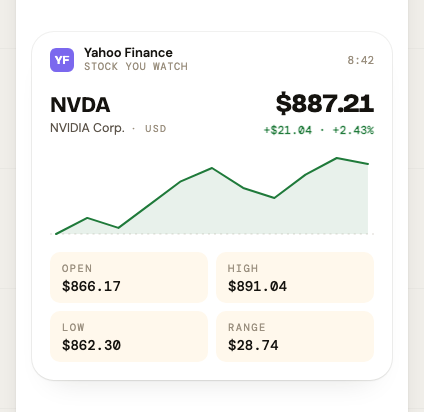
Renders as an OHLC receipt: ticker + name + currency tag on the left, current price + signed change on the right, an OPEN-line sparkline, then an OHLC grid.
Full payload (everything the new design uses):
{
  "symbol": "NVDA",
  "name": "NVIDIA Corp.",
  "currency": "USD",
  "currencySymbol": "$",
  "value": 887.21,
  "change": 21.04,
  "changePct": 2.43,
  "open": 866.17,
  "dayHigh": 891.04,
  "dayLow": 862.30,
  "spark": [866.17, 871, 868, 875, 882, 886, 880, 877, 884, 889, 887.21],
  "axis": ["09:30", "12:00", "16:00"],
  "windowLabel": "Since open",
  "windowShort": "today"
}
Minimum payload (older publishers — the client falls back to a leaner card):
{
  "symbol": "NVDA",
  "name": "NVIDIA Corp.",
  "value": 887.21,
  "change": 21.04,
  "changePct": 2.43,
  "spark": [820, 832, 851, 866, 880, 887]
}
Fields
| Field | Req | Notes |
|---|---|---|
symbol | yes | Ticker. 1–16 chars. |
name | yes | Company / asset name. 1–120 chars. |
value | yes | Current price. Number, not string. |
change | yes | Absolute change since open (signed number). |
changePct | yes | Percent change since open (signed number). |
spark | yes | Sparkline points, 2–256, oldest→newest. |
currencySymbol | no | Unicode symbol prefixed to numeric values. Defaults to "$". Max 8 chars. Use "€", "£", "¥", "₿", "Ξ", "◎", etc. |
currency | no | ISO-ish code shown as a small label near the ticker (e.g. "USD", "AUD"). Lets the client distinguish $887.21 · USD from $887.21 · AUD. 2–8 chars. |
glyph | no | Asset glyph for non-fiat assets (e.g. "Ξ" for ETH). Replaces the ticker badge when present. 1–4 chars. |
open | no | Day's open. Renders in the OHLC grid. |
dayHigh | no | Day's high. |
dayLow | no | Day's low. |
axis | no | 2–12 evenly-spaced labels under the sparkline. Typical intraday: ["09:30", "12:00", "16:00"]. |
windowLabel | no | Long-form window name (e.g. "Since open"). |
windowShort | no | Short-form window name (e.g. "today"). |
No "live" concept. There's no realtime/streaming flag. Publishers re-publish (or PATCH) to update the price; the client treats every read as a snapshot.
Ethereum example (with glyph):
{
  "symbol": "ETH",
  "name": "Ethereum",
  "currency": "USD",
  "currencySymbol": "$",
  "glyph": "Ξ",
  "value": 3580.00,
  "change": 45.00,
  "changePct": 1.27,
  "open": 3520.00,
  "dayHigh": 3612.00,
  "dayLow": 3498.00,
  "spark": [3510, 3530, 3555, 3570, 3580],
  "axis": ["00:00", "08:00", "16:00"],
  "windowLabel": "Since open",
  "windowShort": "today"
}
AUD example:
{
  "symbol": "BHP",
  "name": "BHP Group",
  "currency": "AUD",
  "currencySymbol": "$",
  "value": 42.18,
  "change": -0.32,
  "changePct": -0.75,
  "spark": [42.5, 42.6, 42.3, 42.2, 42.18]
}
6.2 chart — Line Chart
Default variant: v1 (chart-first treatment from design section 04b)
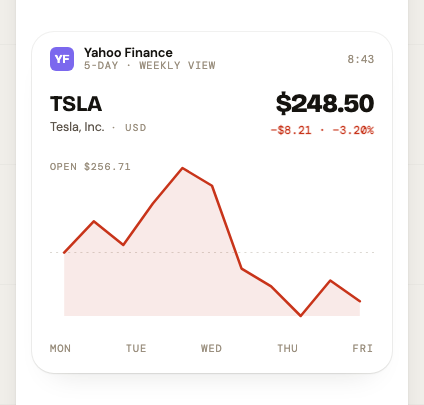
Same identity header as price (ticker + name + currency on the left, value
- signed change on the right) and then a larger chart with a dashed OPEN line and axis labels along the bottom.
Full payload:
{
  "symbol": "TSLA",
  "name": "Tesla, Inc.",
  "currency": "USD",
  "currencySymbol": "$",
  "value": 248.50,
  "change": -8.21,
  "changePct": -3.20,
  "open": 256.71,
  "dayHigh": 272.00,
  "dayLow": 244.10,
  "points": [256.71, 262, 258, 265, 271, 268, 254, 251, 246, 252, 248.50],
  "period": "5D",
  "axis": ["MON", "TUE", "WED", "THU", "FRI"],
  "windowLabel": "5-day",
  "windowShort": "5 days"
}
Fields (same shape as price except spark → points, plus period is required):
| Field | Req | Notes |
|---|---|---|
symbol, name, value, change, changePct | yes | Same semantics as price. |
points | yes | Chart series, 2–2048, oldest→newest. Higher resolution than spark. |
period | yes | Short window code: "1D", "5D", "1M", etc. 1–8 chars. |
currencySymbol, currency, glyph, open, dayHigh, dayLow, axis, windowLabel, windowShort | no | Same semantics as price. axis for a 5-day chart is typically ["MON", "TUE", "WED", "THU", "FRI"]. |
6.3 kpi — Single Big Number
Default variant: v1
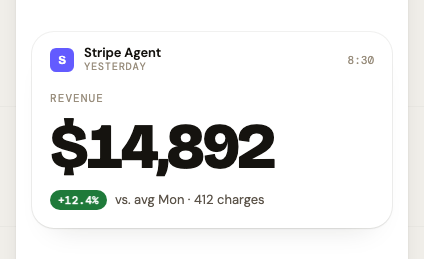
{
  "metric": "Revenue",
  "value": "$14,892",
  "delta": "+12.4%",
  "deltaPos": true,
  "sub": "vs. avg Mon · 412 charges"
}
valueis a string (pre-formatted).delta,deltaPos,subare all optional.
6.4 tweet — Short Post
Default variant: v1
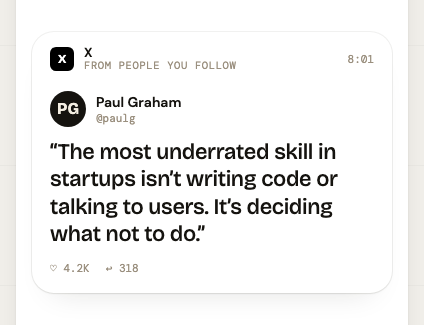
{
  "author": "Paul Graham",
  "handle": "@paulg",
  "text": "The most underrated skill in startups …",
  "likes": "4.2K",
  "replies": 318,
  "url": "https://x.com/paulg/status/…"
}
text: ≤ 800 chars.likesis a string (pre-formatted),repliesis an int.urloptional.
6.5 news — Headline
Default variant: v1
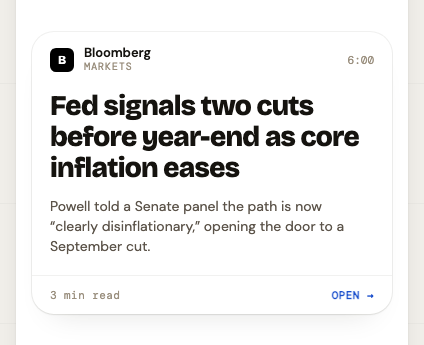
{
  "headline": "Fed signals two cuts before year-end as core inflation eases",
  "standfirst": "Powell told a Senate panel the path is now \"clearly disinflationary,\" opening the door to a September cut.",
  "read": "3 min read",
  "url": "https://bloomberg.com/…"
}
6.6 job — Job Listing
Default variant: v1
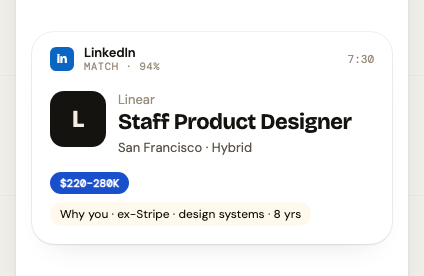
{
  "role": "Staff Product Designer",
  "company": "Linear",
  "location": "San Francisco · Hybrid",
  "salary": "$220–280K",
  "why": "Why you · ex-Stripe · design systems · 8 yrs",
  "url": "https://linear.app/careers/…"
}
6.7 image — Image Card
Default variant: v1
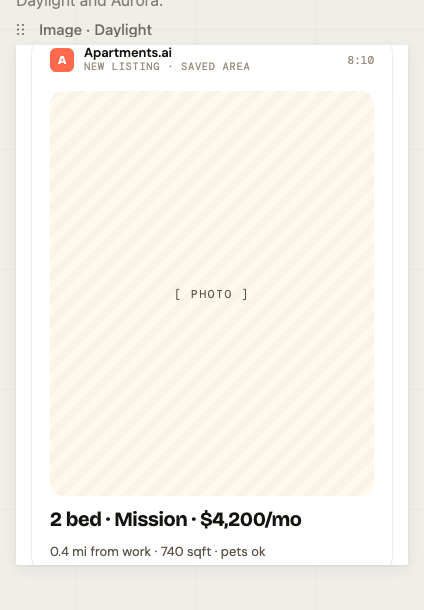
{
  "title": "2 bed · Mission · $4,200/mo",
  "sub": "0.4 mi from work · 740 sqft · pets ok",
  "aspect": "4 / 5",
  "url": "https://cdn.example.com/img.jpg",
  "alt": "Photo of a sunlit Mission apartment living room"
}
aspectis a CSS aspect-ratio string (e.g."4 / 5","16 / 9").- The client renders a placeholder of the right aspect when
urlis absent.
6.8 video — Video Card
Default variant: v1
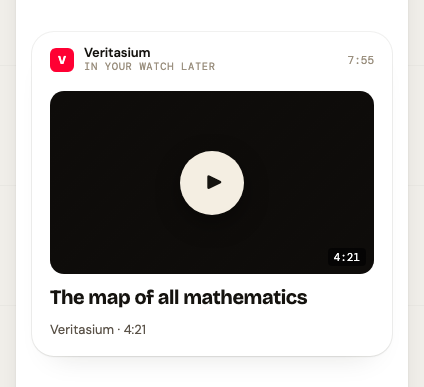
{
  "title": "The map of all mathematics",
  "sub": "Veritasium · 4:21",
  "duration": "4:21",
  "aspect": "16 / 9",
  "url": "https://youtu.be/…",
  "thumbnailUrl": "https://i.ytimg.com/vi/…/maxresdefault.jpg"
}
6.9 audio — Podcast / Audio Clip
Default variant: v1
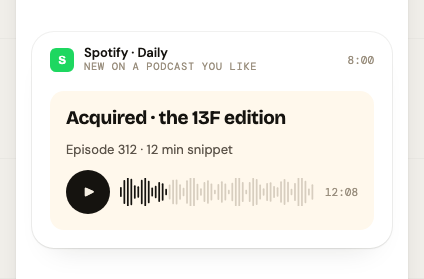
{
  "title": "Acquired · the 13F edition",
  "sub": "Episode 312 · 12 min snippet",
  "duration": "12:08",
  "url": "https://cdn.podcast.com/…/clip.mp3",
  "artworkUrl": "https://cdn.podcast.com/…/cover.jpg"
}
6.10 map — Commute / Route Heads-Up
Default variant: v1
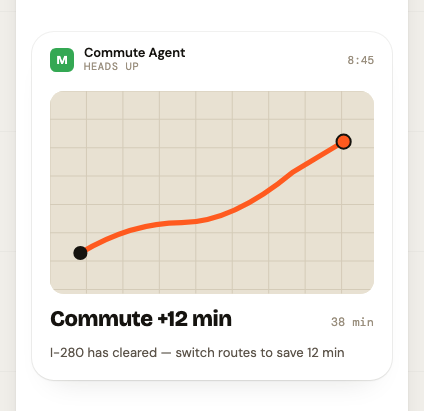
{
  "title": "Commute +12 min",
  "sub": "I-280 has cleared — switch routes to save 12 min",
  "from": "Home",
  "to": "Office",
  "minutes": 38
}
6.11 poll — Short Poll
Default variant: v1
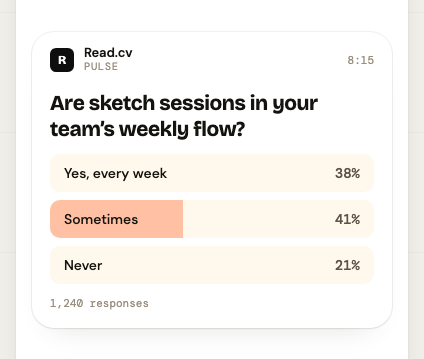
{
  "question": "Are sketch sessions in your team's weekly flow?",
  "opts": [
    { "label": "Yes, every week", "pct": 38 },
    { "label": "Sometimes",       "pct": 41 },
    { "label": "Never",           "pct": 21 }
  ],
  "n": 1240
}
opts: 2–8 entries, each with alabelandpctin [0, 100].- Percentages don't have to sum to 100 — rounding is common.
6.12 quote — Pull-Quote / Highlight
Two visual variants from design section 04m. Data shape is identical — only
the rendering changes. Omit variant to let the client pick.
| Variant | Treatment |
|---|---|
sidebar-rule (V2) | Italic body (~15.5px) indented behind a thin sunburst rule. Calm, blog-like. Good for longer pulls. |
statement (V4) | No quote marks, no container. Display body (~18px/500) with a hairline rule and a small mono source tag. |
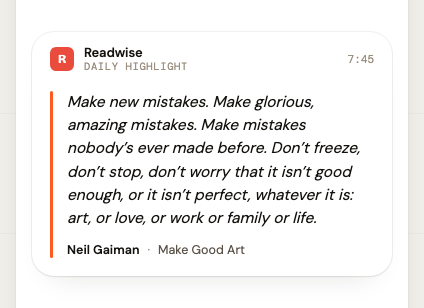
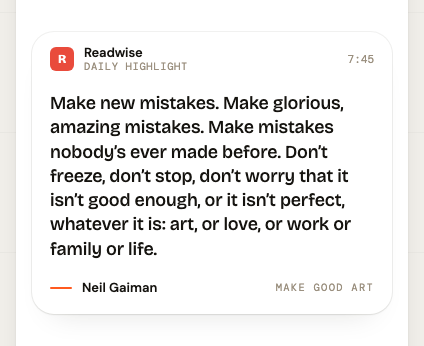
Example (sidebar-rule):
{
  "variant": "sidebar-rule",
  "text": "Make new mistakes. Make glorious, amazing mistakes. Make mistakes nobody's ever made before.",
  "author": "Neil Gaiman",
  "source": "Make Good Art"
}
Example (statement):
{
  "variant": "statement",
  "text": "Make new mistakes. Make glorious, amazing mistakes.",
  "author": "Neil Gaiman",
  "source": "Make Good Art"
}
Fields
| Field | Req | Notes |
|---|---|---|
text | yes | The quote body. 1–600 chars. |
variant | no | "sidebar-rule" or "statement". Omit to let the client default. |
author | no | ≤ 120 chars. |
source | no | Book / article / talk the quote came from. ≤ 160 chars. |
Pre-existing items that have no
variant(or an old"v1"value) continue to read fine; the client should treat unknown / missing values as "client's choice" and pick its default treatment.
6.13 code — Commit / Build Event
Default variant: v1
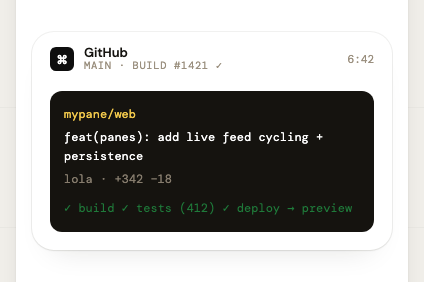
{
  "repo": "mypane/web",
  "commit": "feat(panes): add live feed cycling + persistence",
  "author": "lola",
  "files": "+342 −18",
  "log": "✓ build  ✓ tests (412)  ✓ deploy → preview",
  "url": "https://github.com/mypane/web/commit/…"
}
6.14 weather — Weather Forecast
Variants: hero (default) · data-brick · hourly
Variant 1 — hero (default)
Hero card with large temperature and conditions summary.
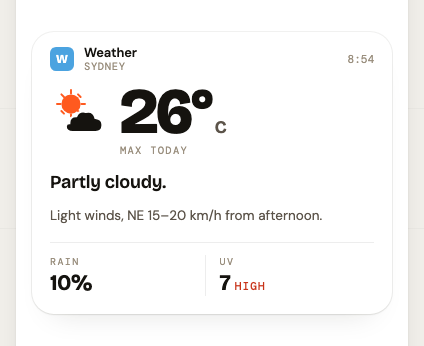
{
  "variant": "hero",
  "temp": 26,
  "tempLabel": "max today",
  "condition": "Partly cloudy",
  "description": "Light winds, NE 15–20 km/h from afternoon."
}
Variant 2 — data-brick
Compact grid showing UV, rain chance, and wind stats.
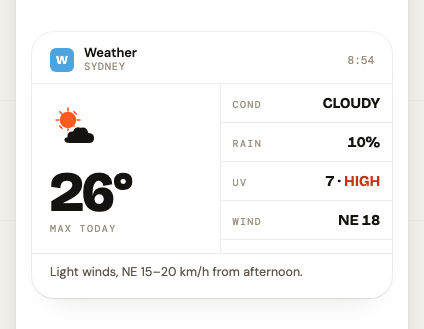
{
  "variant": "data-brick",
  "temp": 26,
  "condition": "Partly cloudy",
  "rainChancePct": 10,
  "uvIndex": 7,
  "uvLabel": "HIGH",
  "wind": "NE 18"
}
Variant 3 — hourly
Scrollable hourly temperature strip with weather icons.
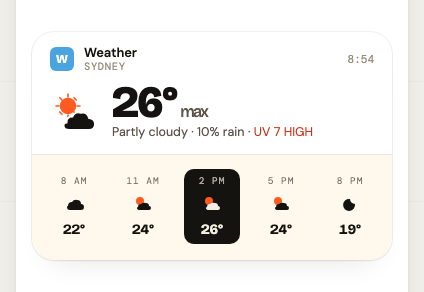
{
  "variant": "hourly",
  "temp": 26,
  "condition": "Partly cloudy",
  "hourly": [
    { "time": "8 AM",  "temp": 22, "icon": "cloud" },
    { "time": "11 AM", "temp": 24, "icon": "sc" },
    { "time": "2 PM",  "temp": 26, "icon": "sc", "isCurrent": true },
    { "time": "5 PM",  "temp": 24, "icon": "sc" },
    { "time": "8 PM",  "temp": 19, "icon": "moon" }
  ]
}
hourly: 2–24 entries. Mark one with"isCurrent": trueto highlight it.iconvalues:"sun","cloud","sc"(sun+cloud),"rain","storm","moon".
6.15 list — List Card
Variants: display-drop-caps (default) · uniform-bullets · hanging-mono · checklist
Variant 1 — display-drop-caps (default)
Large numbered drop-cap initials for each item.
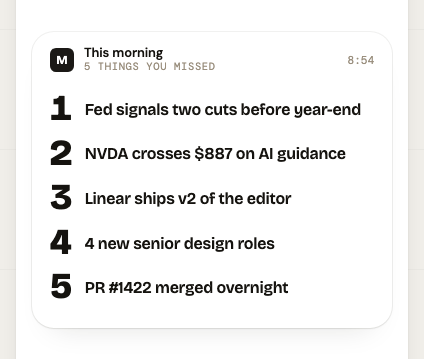
{
  "variant": "display-drop-caps",
  "items": [
    "Fed signals two cuts before year-end",
    "NVDA crosses $887 on AI guidance",
    "Linear ships v2 of the editor",
    "4 new senior design roles",
    "PR #1422 merged overnight"
  ]
}
Variant 2 — uniform-bullets
Simple bullet points with uniform styling.
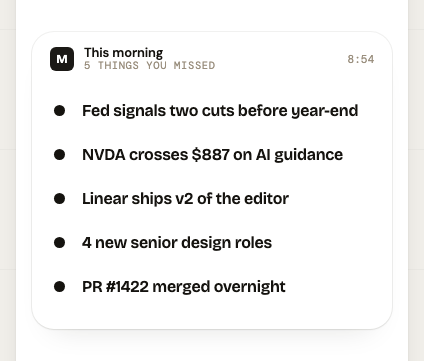
{
  "variant": "uniform-bullets",
  "items": [
    "Tailwind v4 launched with zero-config",
    "Arc browser open-sources sidebar API",
    "Figma Variables: everything you missed"
  ]
}
Variant 3 — hanging-mono
Monospaced hanging numbers for task-style lists.
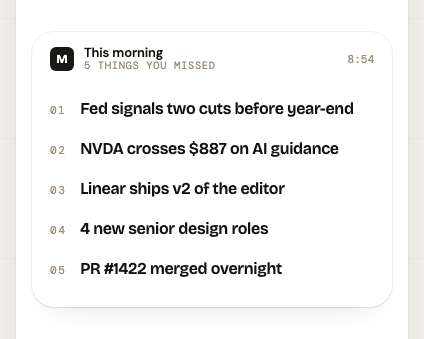
{
  "variant": "hanging-mono",
  "items": [
    "Design review — Pane refinements",
    "Ship feed caching to prod",
    "Write up Q3 OKR proposals"
  ]
}
Variant 4 — checklist
Interactive squircle checkboxes. Items are objects with text and a done boolean — completed items render struck-through.
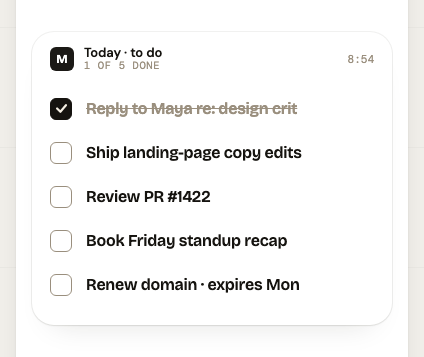
{
  "variant": "checklist",
  "items": [
    { "text": "Reply to Maya re: design crit", "done": true },
    { "text": "Ship landing-page copy edits", "done": false },
    { "text": "Review PR #1422", "done": false },
    { "text": "Book Friday standup recap", "done": false },
    { "text": "Renew domain · expires Mon", "done": false }
  ]
}
Variant 5 — live, backed by a stored list
Instead of items, send a listId pointing at one of the user's stored
lists (§5.20). The card is then a view, not a copy: the server resolves the
reference on every read, so it stays correct as the list changes and nobody has
to republish it.
{
  "listId": "lst_01JBQ8Z4X7MKT2F3WQ9N6RVD5H",
  "variant": "checklist"
}
listId and items are mutually exclusive — a payload carrying both is
rejected. variant is the publisher's choice and defaults to "checklist";
the stored list itself has no opinion about how it is drawn.
What a client receives. On read, the pane's data comes back already
resolved, in the shape every existing client draws, with two additions:
{
  "variant": "checklist",
  "items": [
    { "text": "Milk", "done": true },
    { "text": "Eggs", "done": false }
  ],
  "list": {
    "id": "lst_01JBQ8Z4X7MKT2F3WQ9N6RVD5H",
    "name": "Shopping",
    "version": 7,
    "updatedAt": "2026-09-20T04:15:02.113Z",
    "itemCount": 2,
    "doneCount": 1
  },
  "listItems": [
    { "id": "lit_01J…A", "text": "Milk", "done": true,  "position": 1000, "createdAt": "…", "doneAt": "…" },
    { "id": "lit_01J…B", "text": "Eggs", "done": false, "position": 2000, "createdAt": "…", "doneAt": null }
  ]
}
| Key | Notes |
|---|---|
variant, items | Exactly the existing contract. A client that knows nothing about stored lists draws a correct, current card from these alone. |
list | Identity + change detection: use version/updatedAt to tell whether the card moved since you last drew it. |
listItems | The same items with their ids, so a client can let the user tick one off (PATCH /api/v1/lists/{listId}/items/{itemId}). |
The list block ships with the first Panes iOS release that renders live list
cards; older builds ignore the key. Per the forward-compatibility rule below,
ignore keys you don't recognise rather than failing to decode.
Lifecycle. One live card per list:
- Publishing a
listIdpane for a list that already has a live card updates that card in place — sameitemId, samecreatedAt, bumpedupdatedAt— rather than stacking a second. - Any edit to the list (from the app, REST, or an agent) bumps the card's
updatedAt. It does not push — see §5.19. - Completing or deleting the card removes the card; the list survives. Deleting the list removes its card.
- If the pane's
labelis omitted, it defaults to the list's name. - A
listIdthat doesn't exist or belongs to another account is rejected at publish time with a400.
> **Note:** `checklist` items are `{ text: string, done: boolean }` objects, not plain strings. Mixing the two shapes within a single payload is not supported.

---

### 6.16 `html` — Custom HTML (escape hatch)

Default variant: **`v1`**

A fully custom, purely **visual** pane: the publisher ships arbitrary HTML
(plus optional CSS) that the client renders inside the pane card, filling the
available space. Use this only when no structured type fits — unlike every
other type, the server does not model the content, it only bounds the payload
size.

> ⚠ **No JavaScript.** There is deliberately no `js` field, and the client
> renders with JavaScript **disabled**: any inline `<script>` or `on*` handler
> in your markup will **not execute**. HTML panes are static visual content
> only — you cannot run code on a reader's device. If you need interactivity,
> model it as a structured pane type instead.

| Field | Type | Notes |
| --- | --- | --- |
| `html` | string — required, ≤ 200 000 chars | Body markup, or a complete self-contained document (if it already contains an `<html>` tag it's rendered as-is). Scripts do not run. |
| `css` | string — optional, ≤ 100 000 chars | Injected into a `<style>` block. |
| `responsive` | boolean — optional, default `true` | When true the client injects a mobile viewport + a `width:100%` / word-wrap base so content reflows to the pane width instead of overflowing. When false it renders at the content's natural size. |

```json
{
  "type": "html",
  "publisher": "Acme",
  "publisherInit": "A",
  "publisherColor": "#1A4FCC",
  "label": "Custom",
  "data": {
    "html": "<h1>Q3 revenue</h1><p>Up 24% QoQ.</p>",
    "css": "h1{font:600 22px -apple-system;margin:0 0 8px}p{font:15px -apple-system;color:#5C544A;margin:0}",
    "responsive": true
  }
}
- Keep documents self-contained — with JS off, remote scripts and dynamic loading won't run, so inline your styles and use data URIs for small assets.
- The payload counts against the overall feed-item size limit like any other pane, so large embedded assets can push you over it.
6.17 countdown — Countdown to a Moment
Default variant: v1 (no rendered reference screenshot yet)
"X happens at Y" — the card counts down to target on the reader's device,
and when timezone is present can print the event's local wall-clock time.
| Field | Type | Notes |
|---|---|---|
event | string — required, 1–80 chars | The thing being counted down to; the card's subject. |
target | string — required | ISO-8601 date-time with an explicit offset or Z ("2026-10-04T18:00:00+11:00"). A naive datetime ("2026-10-04T18:00:00") is rejected with 400 — it is not assumed to be UTC. |
timezone | string — optional | IANA tz database id of where the event happens ("Australia/Melbourne"). Abbreviations ("AEST", "EST") and fixed-offset zones ("Etc/GMT-10") are rejected — they are ambiguous and don't follow DST. "UTC" is accepted. |
sub | string — optional, ≤ 120 chars | One line of context under the event name. |
Publish:
{
  "event": "Melbourne Cup",
  "target": "2026-11-03T15:00:00+11:00",
  "timezone": "Australia/Melbourne",
  "sub": "Flemington · Race 7"
}
Read (what GET /feed/items returns in data):
{
  "event": "Melbourne Cup",
  "target": "2026-11-03T04:00:00.000Z",
  "targetOffset": "+11:00",
  "timezone": "Australia/Melbourne",
  "sub": "Flemington · Race 7"
}
targetis stored and returned normalised to UTC. The offset the publisher wrote it in is kept alongside astargetOffset("Z"or"±HH:MM"), for reference only — the UTC instant is the source of truth.timezoneis passed through untouched. Format the wall clock on the client (e.g.DateFormatterwithTimeZone(identifier:)); the server does no local formatting because it doesn't know where the reader is.- Compute the remaining time against the server's clock, not the phone's:
read the HTTP
Dateheader on the feed response (§2) and correct for skew. - What the card shows once
targethas passed (count up, "happening now", hide) is the client's decision. The server has no post-target behaviour. - Publishers are advised (not required) to set
expiresAttotargetplus a short grace window, so fired countdowns clear themselves.
Forward-compatibility rule
When the server adds a new pane type:
- Servers won't notify you. Hit
GET /api/v1/panes/typesperiodically (e.g. at app launch + on resume after long backgrounding) to refresh the list. - If you receive an item whose
typeyou don't recognize, render a graceful fallback ("Unsupported pane — update the app to see this") and preserve the row in your local store. Do not crash, do not drop the row.
7. Recommended iOS client flows
7.1 Onboarding — new user signs up from the app
- App collects
firstName,lastName,dateOfBirth(UIDatePicker→yyyy-MM-dd),email. POST /api/v1/auth/signupwith that body.- On 201, immediately store
response.token.tokenin Keychain. This is the only time the server returns it. - Store
response.userin your local profile model. - Drop the user into the feed view.
7.2 Onboarding — returning user already has a token
The user pastes their mp_… token into a single text field. Validate by
hitting any authed endpoint (the cheapest is GET /feed/items?limit=1).
- 200 → token is good. Save to Keychain.
- 401 → wrong/revoked token. Show error, ask again.
7.3 Authenticated request — minimal Swift
let token = Keychain.read(.apiToken)!     // your wrapper
var req = URLRequest(url: url)
req.setValue("Bearer \(token)", forHTTPHeaderField: "Authorization")
req.setValue("application/json", forHTTPHeaderField: "Content-Type")
Always read the version header so you can warn on a major-version skew:
if let v = httpResponse.value(forHTTPHeaderField: "X-MyPane-Api-Version"),
   Int(v) ?? 1 > supportedMajorVersion {
   showUpdateNudge()
}
7.4 Reading the feed
At app launch (cold start):
- Read your last-seen cursor from local storage (or
nil). - Loop
GET /feed/items?order=asc&cursor=<last>untilnextCursorisnull. - Store every item in your local DB keyed by
itemId. ULIDs are sortable — you can render the list ordered byitemIdascending without re-sorting. - Persist the last
nextCursoryou got that was non-null only if you actually consumed everything beyond it; otherwise persist the cursor of the last item you've shown. (Cursor is opaque, so just store the string.)
On foreground / pull-to-refresh:
Same loop. Polling stays the source of truth even with push enabled (§5.19) —
push is a nudge to sync, not a delivery mechanism, and it's off by default. A
reasonable default cadence: pull on foreground, on
UIApplicationDidBecomeActiveNotification, and at most once per 60s while in
foreground. Don't poll while backgrounded. When a batch notification arrives,
run the same after= pull rather than trusting pane_ids to be complete.
For the "morning batch" UX from the design, you don't need real-time — agents publish overnight, the user reads it in one swoop. Polling on app open is plenty.
7.5 Publishing from the iOS app
Native clients normally read, not publish. Publishing is for agents running elsewhere (servers, Lambdas, Zapier-style integrations). But if the app does publish (e.g. a "share to my pane" extension):
- Validate
dataagainst the schema you cached fromGET /panes/types. POST /api/v1/feed/itemswith the user's bearer token.- On 201, insert the returned item into your local feed at the right
sorted position (by
itemId). No re-fetch needed.
7.6 Codable models
The minimum a Swift client needs:
struct ApiError: Codable, Error {
  struct Body: Codable { let code: String; let message: String }
  let error: Body
}

struct FeedItem: Codable, Identifiable {
  let itemId: String
  let userId: String
  let feedId: String
  let type: String
  let publisher: String
  let publisherInit: String?
  let publisherColor: String?
  let label: String?
  // Speak-aloud hint. Optional in Swift on purpose: decode a missing value as
  // false so the same struct works against a server that predates the flag.
  let readable: Bool?
  // Honoured priority flag. Optional for the same reason: missing = false.
  let priority: Bool?
  let data: [String: AnyCodable]   // type-specific; decode per `type`
  let createdAt: Date              // ISO-8601 with fractional seconds
  let tokenId: String

  var id: String { itemId }
}

struct FeedPage: Codable {
  let items: [FeedItem]
  let nextCursor: String?
}
Configure the JSONDecoder with .iso8601WithFractionalSeconds:
let dec = JSONDecoder()
dec.dateDecodingStrategy = .custom { decoder in
  let s = try decoder.singleValueContainer().decode(String.self)
  let fmt = ISO8601DateFormatter()
  fmt.formatOptions = [.withInternetDateTime, .withFractionalSeconds]
  guard let d = fmt.date(from: s) else {
    throw DecodingError.dataCorruptedError(in: try decoder.singleValueContainer(),
                                           debugDescription: "Bad ISO date: \(s)")
  }
  return d
}
For data, decode per-type into a concrete enum:
enum PaneData {
  case price(Price)
  case chart(Chart)
  case tweet(Tweet)
  // …
  case unknown(rawType: String, raw: [String: AnyCodable])
}
Always handle .unknown — see §6 forward-compat rule.
7.7 Error handling
Treat 401 globally — when you get one, the token is gone or revoked. Wipe Keychain and route to the login screen.
Treat 5xx as retryable with exponential backoff (1s, 2s, 4s, 8s, give up).
Treat 4xx as terminal — surface the error.message to the user; don't retry.
Treat network errors the same as 5xx (retryable, transient).
8. Gotchas, do's and don'ts
| ❌ Don't | ✅ Do |
|---|---|
Store the token in UserDefaults, plist, or shared container. | Keychain with …ThisDeviceOnly accessibility. |
| Try to "log in with email/password" — no such endpoint exists. | The token is the credential, full stop. |
Decode the nextCursor to peek inside it. | Treat it as an opaque string. |
Sort the feed by createdAt strings. | Sort by itemId (ULID) — sub-ms ties break deterministically. |
Assume publisher is a known set. | It's an arbitrary string the publisher chose. Render it. |
Crash on an unknown type. | Render an "unsupported" placeholder, keep the row. |
Send Content-Type: application/json but no body on a GET. | GETs don't need a body or content-type. |
Hard-code https://localhost:3000. | Read base URL from a build-time config (Info.plist). |
Re-format pre-formatted strings like "+12.4%" or "$220–280K". | Render them as-is. The publisher decided the format. |
| Use the session cookie from iOS. | Bearer token only. |
9. What v1 deliberately doesn't have
Plan for these existing but knowing they're not in v1:
- No multiple feeds per user. Items already carry
feedId: "default"on the wire — when v2 (or v1.1, as long as it's additive) introduces multi-feed, the field stays where it is. - No "seen / unread" state. Completion (
PATCH→"status":"completed") covers acted-on items; purely visual read/unread tracking still lives on the client. - Push is a prototype, not a channel. Batched "N new panes for you" notifications exist (§5.19) but are off by default, have no per-user preferences or quiet hours, and are best-effort — poll for correctness.
- No magic-link / email recovery. If the user loses their token and session, the only fix today is signing up again.
- No image upload endpoint. Pane types that reference media (
image,video,audio) take aurlthe publisher already hosts. - No webhooks for new items. Coming when multi-feed lands.
- No rate limiting on the REST surface. Be polite. (Agent writes over the
MCP server do share one generous per-user bucket — see
docs/MCP.md.)
When these arrive, they'll be additive endpoints (or new optional fields) —
no breaking changes within v1.
10. Quick-reference endpoint table
| Method | Path | Auth | What |
|---|---|---|---|
| GET | /api/v1/health | — | Liveness + which DB driver. |
| GET | /health | — | Liveness + readiness (verifies DB reachable). 503 if down. |
| GET | /metrics | bearer (METRICS_TOKEN) | Prometheus metrics. Gated; 503 if unconfigured. |
| POST | /api/v1/auth/signup | — | Create user + return initial token. |
| POST | /api/v1/auth/login | — | Web only: token → session cookie (+ refresh token). |
| POST | /api/v1/auth/logout | session | Web only. Optional body kills a refresh token. |
| POST | /api/v1/auth/refresh | — | Exchange a refresh token for a renewed session (rotates the token). |
| GET | /api/v1/auth/me | session | Web only. Also returns plan + pane_count. |
| DELETE | /api/v1/auth/me | bearer | Permanently delete the account (hard delete, cascades). 204. |
| POST | /api/v1/verify-receipt | bearer | Verify an App Store receipt; upgrades plan. |
| POST | /api/v1/webhooks/revenuecat | shared secret | RevenueCat → server. Maps subscription events to plan. Not for client use. |
| GET | /api/v1/auth/tokens | session | Web only: list tokens. |
| POST | /api/v1/auth/tokens | session | Web only: create token. |
| DELETE | /api/v1/auth/tokens/{tokenId} | session | Web only: revoke. |
| GET | /api/v1/panes/types | — | Pane types + JSON Schema. |
| POST | /api/v1/feed/items | bearer | Publish a pane. |
| GET | /api/v1/feed/items | bearer | Read the feed (paginated). |
| GET | /api/v1/feed/items/{itemId} | bearer | Single item. |
| PATCH | /api/v1/feed/items/{itemId} | bearer | Mark a pane completed. |
| DELETE | /api/v1/feed/items/{itemId} | bearer | Delete a single item. |
| GET | /api/v1/lists | bearer | Stored lists index (no item bodies). |
| POST | /api/v1/lists | bearer | Create a list. 409 + the existing list on a name collision. |
| GET | /api/v1/lists/{listId} | bearer | One list, items in position order. |
| PATCH | /api/v1/lists/{listId} | bearer | Rename or archive. |
| DELETE | /api/v1/lists/{listId} | bearer | Hard-delete the list and its items. 204. |
| POST | /api/v1/lists/{listId}/items | bearer | Append/insert items. Duplicates are skipped. |
| PATCH | /api/v1/lists/{listId}/items/{itemId} | bearer | Set text / done / position. |
| DELETE | /api/v1/lists/{listId}/items/{itemId} | bearer | Remove one item. 204 when already gone. |
| POST | /api/v1/lists/{listId}/items/clear-done | bearer | Remove every done item. |
| POST | /api/v1/devices | bearer / session | Register an APNs token for push. Idempotent; 200. |
| GET | /api/v1/devices | bearer / session | List the caller's registered devices. |
| DELETE | /api/v1/devices/{deviceToken} | bearer / session | Unregister on logout. 204. |
11. End-to-end smoke (curl)
A scripted version lives at scripts/smoke.ts in the server repo — run
npm run smoke against a live dev server. The same flow by hand:
BASE=https://localhost:3000

# 1. Sign up — capture the token from the response
TOKEN=$(curl -s -X POST "$BASE/api/v1/auth/signup" \
  -H "Content-Type: application/json" \
  -d '{"firstName":"Test","lastName":"User","dateOfBirth":"1990-01-15","email":"test+'$(date +%s)'@example.com"}' \
  | jq -r .token.token)
echo "TOKEN=$TOKEN"

# 2. Publish a tweet pane
curl -s -X POST "$BASE/api/v1/feed/items" \
  -H "Authorization: Bearer $TOKEN" \
  -H "Content-Type: application/json" \
  -d '{
    "type":"tweet",
    "publisher":"X",
    "publisherInit":"X",
    "publisherColor":"#000000",
    "label":"From people you follow",
    "data":{"author":"PG","handle":"@paulg","text":"Hello world.","likes":"1.2K","replies":3}
  }' | jq

# 3. Read it back in FIFO order
curl -s "$BASE/api/v1/feed/items?order=asc&limit=10" \
  -H "Authorization: Bearer $TOKEN" | jq