Pane types / list
list
A handful of short parallel items — a roll-up of numbers, today's agenda, a set of tasks — or a live view of a stored list the user keeps on the server.
A bulleted or numbered list of text items, a checklist, or a live card backed by one of the user's stored lists (send listId instead of items).
Variants
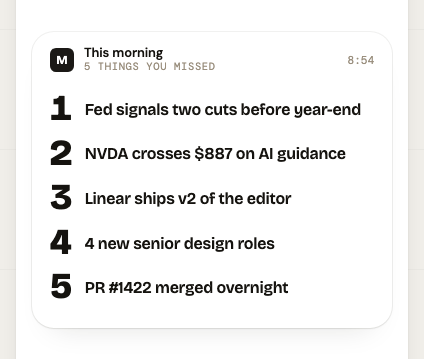
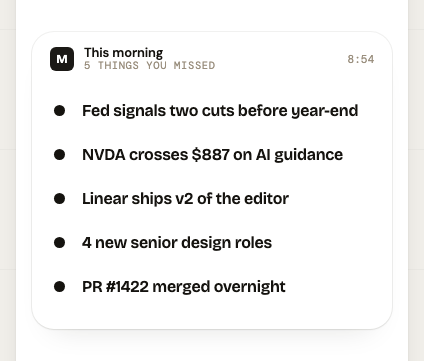
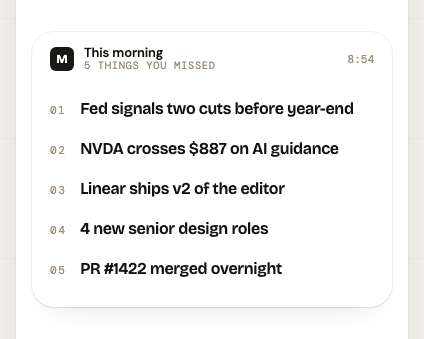
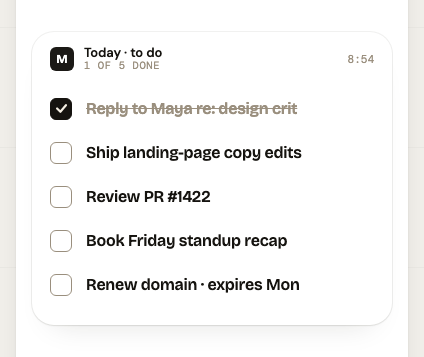
Set data.variant to one of: display-drop-caps, uniform-bullets, hanging-mono, checklist. Picking the wrong one is the most common way a card comes out looking foreign.
- Pick the variant by content:
"checklist"for things with a done state,"uniform-bullets"for a roll-up of facts,"display-drop-caps"for a short editorial list,"hanging-mono"when items are code, IDs, or figures. On alistIdpane the variant is yours to choose and defaults to"checklist"— the stored list itself has no opinion about how it is drawn. - The
"checklist"variant takes objects ({ text, done }); every other variant takes plain strings. Mixing the two is the most common validation failure on this type.
Fields in data
The envelope around data (publisher, label, expiresAt…) is the same on every type: see the envelope.
data takes one of 3 shapes, never a mix.
Shape 1: requires listId
| Field | Type | Notes | |
|---|---|---|---|
listId | string | required | matches ^lst_ |
variant | "display-drop-caps" | "uniform-bullets" | "hanging-mono" | "checklist" | optional | Design variant to render. Defaults to checklist on a live list card. |
Shape 2: requires variant and items
| Field | Type | Notes | |
|---|---|---|---|
variant | "checklist" | required | |
items | array of objects | required | 1–30 items |
items[].text | string | required | 1–256 chars |
items[].done | boolean | required |
Shape 3: requires items
| Field | Type | Notes | |
|---|---|---|---|
variant | "display-drop-caps" | "uniform-bullets" | "hanging-mono" | optional | Design variant to render. |
items | array of string | required | 1–30 items · each 1–256 chars |
How it renders
- Every variant sets items at 16pt display — roughly 40 characters per line on a phone-width card, then it wraps.
- The mark (bullet, drop cap, numeral, checkbox) is drawn by the treatment in a fixed left gutter; your text starts after it.
- There is no title row inside the card — the envelope's
labelis the list's only heading. On a live list card that heading is the list's NAME, filled in for you when you omitlabel. - A
listIdpane is resolved on every read:datacomes back as{ variant, items }— the shape the client already draws — plus alistblock carrying the list's id, name, version, counts andupdatedAt, and alistItemsarray giving each item's id so a client can let the user tick one off. - The
listblock arrives with the first Panes iOS release that renders live list cards. Older builds ignore the key and draw the resolveditems, which are correct either way — so publishing alistIdpane is safe before every client has updated.
Craft
- Decide first whether this is a SNAPSHOT or a LIVE list. Send
itemsfor something true at this moment that nobody will edit (yesterday's numbers, today's agenda). SendlistIdfor something the user keeps and changes — shopping, to-do, packing. - Never publish a stored list's contents as
items. The card would be a photocopy: the user ticks something off in the app and the pane keeps showing the old state. Send thelistIdand let the server resolve it on every read. listIdanditemsare mutually exclusive. To put a list you're composing into the feed, create the stored list first (REST/api/v1/listsorcreate_list), then publish its id.- On a
listIdpane,labeldefaults to the list's name — omit it unless you have something the name doesn't say ("Before Friday", "From your recipe"). - 3–6 items is the range that reads well. The schema allows 30; 30 is a document, not a card.
- Keep each item to one line on a phone — about 40 characters. Items are set at 16pt display, so they run out of room a long way before the schema's 256.
- Drop the empty buckets. "0 enterprise" in a roll-up spends a line saying nothing; leave it out until there's one.
- Write items in parallel grammar: all fragments or all sentences, all starting with the same part of speech.
- Pick the variant by content:
"checklist"for things with a done state,"uniform-bullets"for a roll-up of facts,"display-drop-caps"for a short editorial list,"hanging-mono"when items are code, IDs, or figures. On alistIdpane the variant is yours to choose and defaults to"checklist"— the stored list itself has no opinion about how it is drawn. - The
"checklist"variant takes objects ({ text, done }); every other variant takes plain strings. Mixing the two is the most common validation failure on this type. - Front-load the distinguishing word — the eye scans the first two words of each line.
- Avoid
expiresAton a live list card. It's allowed, but a card that clears itself while the list it shows is still in use is a card the user has to ask for again.
Avoid
- Don't use a list to hold one item, and don't pad to a round number.
- Don't restate the card's subject in every item ("Revenue: …", "Revenue growth: …") — put the subject in
label. - Don't nest or use manual bullet characters/numbers in item text; the treatment adds the marks.
- Don't publish a second
listIdpane for a list that already has one — publishing is an upsert, and republishing updates the existing card in place rather than stacking a duplicate.
Examples
Complete payloads for POST /api/v1/feed/items or the MCP publish_pane tool.
A live card for a list the user keeps and edits
{
  "type": "list",
  "publisher": "Panes",
  "publisherInit": "P",
  "publisherColor": "#FF5A1F",
  "data": {
    "listId": "lst_01JBQ8Z4X7MKT2F3WQ9N6RVD5H",
    "variant": "checklist"
  }
}
A roll-up of the numbers that don't each deserve a card
{
  "type": "list",
  "publisher": "Panes Ops",
  "publisherInit": "P",
  "publisherColor": "#FF5A1F",
  "label": "Yesterday at a glance",
  "data": {
    "variant": "uniform-bullets",
    "items": [
      "431 users · 88 publishers · 4 enterprise",
      "1,204 panes sitting unread in feeds",
      "37 API tokens issued this week",
      "Most-published types: kpi · news · price"
    ]
  }
}
Tasks with a done state, snapshotted from a task manager
{
  "type": "list",
  "publisher": "Linear",
  "publisherInit": "L",
  "publisherColor": "#5E6AD2",
  "label": "Due today",
  "data": {
    "variant": "checklist",
    "items": [
      {
        "text": "Ship the OAuth consent copy fix",
        "done": true
      },
      {
        "text": "Review the reader-cap migration",
        "done": true
      },
      {
        "text": "Draft the pricing page rewrite",
        "done": false
      },
      {
        "text": "Reply to the App Store reviewer",
        "done": false
      }
    ]
  }
}
A short editorial list where each item is a phrase, not a fact
{
  "type": "list",
  "publisher": "Field Notes",
  "publisherInit": "FN",
  "publisherColor": "#1A4FCC",
  "label": "Three things worth knowing",
  "data": {
    "variant": "display-drop-caps",
    "items": [
      "Interest rates held for the fourth meeting running",
      "Two of your holdings report earnings this week",
      "The AUD closed above 68c for the first time since March"
    ]
  }
}